
GB WhatsApp APK Download v18.80 (2026)
Everything you need to know about GB WhatsApp v18.80 - features, anti-ban protections, fixed login issues, dual accounts, custom themes, installation guide, and why rooted users should consider WA Enhancer X. Read our detailed GB WhatsApp vs WA Enhancer X Comparison to decide which mod fits your needs best. (Source & Mirror: gbwhatsp.com)
Download GB WhatsApp APK (v18.80)What Is GB WhatsApp?
GB WhatsApp is an unofficial, third-party modification of WhatsApp built for Android. It preserves all the core messaging capabilities you're already familiar with - chats, voice notes, calls, media sharing - while layering on a much deeper set of privacy controls, visual customization, and quality-of-life tools that the official app simply doesn't offer.
Because it isn't listed on the Google Play Store, you'll need to download the APK directly and install it manually. That process is straightforward, but it does come with trade-offs worth knowing before you start - more on that in the pros and cons section below.
Key Features at a Glance
Before going deeper, here's a quick overview of what makes GB WhatsApp stand out:
Privacy Features Explained
Privacy is the most common reason people switch to GB WhatsApp, and it delivers on that front in several meaningful ways.
Ghost Mode
Activate Ghost Mode and you become effectively invisible while using the app. Your online status is hidden, read receipts aren't sent, and your typing indicator stays silent. Nobody sees that you're there - which is genuinely useful when you need focus time without the social pressure of being visibly online.
Settings → Privacy → Ghost Mode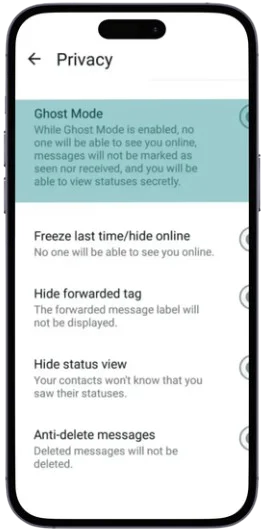
Hide Last Seen, Blue Ticks, and More
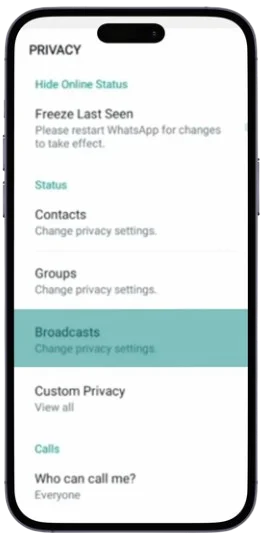
Beyond Ghost Mode, you can toggle individual privacy signals independently. Want to read messages without sending double blue ticks? Done. Want to let people know you're online but hide when you were last active? That's an option too. You have granular control over what others can and can't see.
Chat Lock and Hidden Chats
Sensitive conversations can be locked behind a PIN, password, or fingerprint. You can also hide chats entirely so they don't appear on the home screen at all. Both features work independently, so you can use either or combine them depending on how much protection you need.
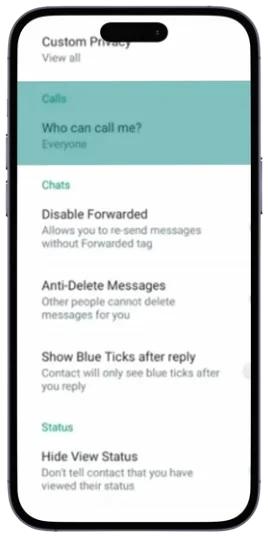
Call Privacy
GB WhatsApp lets you block calls from specific contacts without blocking the contact itself. Useful for filtering spam calls while keeping the conversation thread open.
Customization and Themes
The built-in theme store is one of the most popular aspects of GB WhatsApp. You can browse hundreds of community-created designs - from minimal dark interfaces to colorful animated layouts - and apply them in seconds.
Beyond themes, you can adjust fonts, chat bubble colors, and the overall display density. If the standard green-and-white WhatsApp aesthetic has always felt a bit impersonal, this level of customization genuinely changes the experience.
Productivity Tools
Dual Account Support
GB WhatsApp runs as a separate app, which means it can hold a second phone number entirely independent of your official WhatsApp installation. Both can run simultaneously on the same device. You can give each account a different theme and privacy profile, making it easy to keep work and personal conversations clearly separated.
Auto-Reply and Message Scheduling
You can set up automated responses for specific contacts or all messages, and schedule messages to be delivered at a future time. Both features are particularly useful if you manage a lot of conversations and need to stay responsive without being constantly attached to your phone.
Do Not Disturb (DND) Mode
Unlike simply muting notifications, DND Mode in GB WhatsApp actually pauses incoming and outgoing messaging activity within the app while you're focused. Great for study sessions, deep work, or meetings.
Extended Group and Status Limits
The official WhatsApp caps status updates at a relatively short character count. GB WhatsApp extends this to 5,000 characters, giving you space to write proper updates, announcements, or creative posts. Group capacity and broadcast lists are also expanded beyond the official limits.
Anti-Delete Messages
One of the most-used features: when someone deletes a message they've sent you, it stays visible on your end. This applies to text, images, and voice notes alike.
Built-In Backup and Media Management
GB WhatsApp includes a local backup system that encrypts and stores your chat history and media on your device - no cloud dependency required. This is worth setting up before any major app updates to avoid data loss.
A built-in status downloader lets you save photos and videos posted by your contacts directly to your device, without needing a separate app.
Before You Download - Things to Check
A smooth installation starts with a few quick checks:
- Android version: GB WhatsApp works best on Android 5.0 and above. Older versions may experience instability.
- Storage space: Make sure you have at least a few hundred MB free before downloading.
- Battery level: Keep your phone charged during installation to avoid interruptions.
- Unknown sources: You'll need to allow app installations from sources outside the Play Store.
- Stable internet: A weak connection can corrupt the download. Use Wi-Fi if possible.
How to Download and Install GB WhatsApp on Android
- 1
Download the APK
Head to a trustworthy source and download the latest GB WhatsApp APK. Always verify you're on a known, reputable site before downloading any third-party APK. Before proceeding, go to Settings → Security → Unknown Sources and enable it.
- 2
Install the File
Once the download finishes, open your file manager and tap the APK file. Your phone will ask for installation permission - confirm it and wait a few seconds for the process to complete. Tap Done when it finishes.
- 3
Verify and Set Up Your Account
Open GB WhatsApp and enter your phone number. You'll receive a one-time verification code via SMS - enter it to confirm your number. After that, set your profile name and photo, and optionally restore from a backup if you have one.
Using GB WhatsApp on PC
GB WhatsApp doesn't have a native desktop client, but you can run it on a PC using an Android emulator. Reliable options include:
- BlueStacks
- NoxPlayer
- LDPlayer
Download and install your preferred emulator, sign in with a Google account, download the GB WhatsApp APK from within the emulator's browser, and verify your number as you would on a phone. The full feature set is available on your desktop.
GB WhatsApp Pros and Cons
Understanding both sides helps you make an informed decision.
- Granular privacy controls far beyond the official app
- Dual account support for personal and professional contacts
- Deep and easy-to-use theme customization
- Anti-delete and auto-reply for daily use
- Multi-language support for international audiences
- No automatic updates - manual APK downloads required
- Security risk from downloading from untrusted sources
- Data loss risk if the app crashes or a bad update breaks something
- Account suspension risk - WhatsApp has flagged unofficial clients
Frequently Asked Questions
Updates aren't automatic. When a new version is released, you'll need to download the updated APK from a reliable source and install it over your existing version. Back up your chats first - just in case.
Yes, as long as they're registered to different phone numbers. Both can run simultaneously on the same device without conflicting with each other.
The official app prioritizes security, compliance, and a clean, simple experience. GB WhatsApp trades some of those guarantees for greater flexibility - more privacy toggles, more customization, and more communication tools. Which matters more depends on how you use the app.
The app itself, when downloaded from a trustworthy source, is widely used without issues. The risks are primarily around downloading from shady sites (malware), lack of end-to-end audit (the code isn't independently verified), and occasional ban risk. If those trade-offs are acceptable to you, many millions of users have used it without incident.
On a Rooted Android? WA Enhancer X Might Be a Better Fit
If your phone is rooted and you have LSPosed set up, WaEnhancer hooks directly into the official WhatsApp app rather than replacing it - meaning you stay on the real, verified WhatsApp binary with lower ban risk.
Not sure which option is right for you? Read our GB WhatsApp vs WA Enhancer X comparison or check out our Indonesian guide on Download WA Enhancer APK Terbaru first.
This article is for informational purposes. GB WhatsApp and WaEnhancer are unofficial tools not affiliated with WhatsApp Inc. or Meta. Use them at your own discretion and always download from trusted sources.